People expect websites and apps to load fast. If a page takes too long to open, users may leave. One common reason for slow loading is an empty cache (also called a cold cache). When the cache is empty, the server has to work harder to build the page, which takes more time.
A warmup cache request is a simple way to fix this problem. It helps your website get ready before real users visit. In this guide, you will learn what warmup cache requests are, why they are useful, when to use them, and how to use them in a safe way.
What Is a Warmup Cache Request?
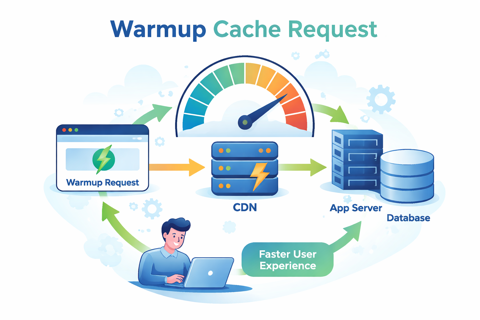
A warmup cache request is a request sent to your website or API to fill the cache before users arrive. It works like a practice visit. The system loads the page once, saves the result in the cache, and then real users get a faster response.
Simple explanation
-
Without warmup:
First user → slow page → bad experience -
With warmup:
Warmup request → cache filled → first user gets fast page
Cache Warmup vs Other Methods
| Method | What It Does | Simple Meaning |
|---|---|---|
| Cache warmup | Fills cache before users come | Prepare pages early |
| Prefetching | Browser loads files early | Guess what user will click |
| Pre-rendering | Builds pages ahead of time | Create pages before needed |
| Normal caching | Cache fills when users visit | First user is slow |
Why Warmup Cache Requests Are Important
Cache warmup helps both users and servers.
Main Benefits
-
Pages load faster for the first users
-
Less pressure on servers
-
Better user experience
-
More stable website during traffic spikes
-
Better performance scores
-
Fewer slow pages after updates
How Warmup Helps
| Area | Without Warmup | With Warmup |
|---|---|---|
| First visit speed | Slow | Fast |
| Server load | High at start | Lower |
| Website stability | Can break under load | More stable |
| User experience | Poor for first users | Good for all users |
| Performance scores | Can drop | More stable |
When Should You Use Cache Warmup?
Cache warmup is useful when your cache is often cleared or rebuilt.
Good Times to Use Warmup
-
After you update your website
-
After you clear the cache
-
Before a big sale or campaign
-
Before many users visit at once
-
When new servers start
-
When new content is published at a set time
Read also: Manyroon
Simple Decision Table
| Situation | Use Warmup? | Why |
|---|---|---|
| Small personal blog | Maybe not | Low traffic |
| Online store sale | Yes | Many users at once |
| New website update | Yes | Cache is empty |
| User login pages | No | Personal data |
| Public landing pages | Yes | Many users visit |
What Pages Should Be Warmed?
Not every page should be warmed. Only warm pages that many users will visit.
Pages That Are Good to Warm
-
Homepage
-
Main category pages
-
Popular blog posts
-
Product pages
-
Public API pages
Pages You Should Not Warm
-
User profile pages
-
Shopping cart pages
-
Admin pages
-
Private or secure pages
-
Pages with personal data
Page Selection Table
| Page Type | Warm It? | Reason |
|---|---|---|
| Homepage | Yes | Many users visit |
| Product page | Yes | High traffic |
| User profile | No | Personal data |
| Checkout page | No | Sensitive data |
| Blog post | Yes | Public content |
| Admin panel | No | Security risk |
How Warmup Cache Requests Work
Most websites use more than one cache layer.
Common Cache Layers
-
CDN cache – Saves pages close to users
-
App cache – Saves results in the server
-
Database cache – Saves database results
How a Warmup Request Travels
Warmup tool → CDN → App server → Database → Cache is filled → Ready for users
Cache Layers Table
| Cache Layer | What It Does | Benefit |
|---|---|---|
| CDN cache | Stores pages near users | Faster loading |
| App cache | Stores page results | Less server work |
| DB cache | Stores query results | Faster data access |
Ways to Implement Cache Warmup
There are many simple ways to do cache warmup.
Common Methods
-
Run a simple script to visit pages
-
Use an automatic job after updates
-
Run warmup when cache is cleared
-
Use a list of important URLs
-
Warm pages slowly to avoid overload
Method Comparison Table
| Method | Best For | Good Point | Bad Point |
|---|---|---|---|
| Manual script | Small sites | Easy to use | Not automatic |
| Automatic job | Most sites | Reliable | Needs setup |
| Event-based | Modern systems | Runs only when needed | More setup |
| URL list | Content sites | Easy to manage | May warm low-value pages |
| Rate-limited | Big sites | Safe for servers | Takes longer |
Best Practices for Cache Warmup
Do This
-
Warm only important pages
-
Send warmup requests slowly
-
Use the same settings as real users
-
Check that cache is working
-
Track results and errors
-
Separate warmup traffic from real users
Avoid This
-
Warming every page on the site
-
Warming private or secure pages
-
Sending too many requests at once
-
Ignoring cache rules
-
Forgetting to monitor server load
Common Problems and Risks
Warmup can cause problems if done in the wrong way.
Common Problems
-
Too many warmup requests at once
-
Server becomes slow or crashes
-
Fake traffic shows in reports
-
Cache does not work as expected
-
Warming pages that change too often
Risk Table
| Risk | Problem | How to Fix |
|---|---|---|
| Server overload | Site slows down | Limit request speed |
| Fake analytics | Wrong data | Mark warmup traffic |
| Wrong cache rules | Cache not used | Fix cache settings |
| Private data cached | Security risk | Block private pages |
| Short cache time | Warmup wasted | Warm only long-life pages |
How to Measure If Warmup Is Working
You should always check if warmup helps.
What to Measure
-
Cache hit rate
-
Page load time
-
First response time
-
Server CPU and memory
-
Error rate
-
Real user speed
Before vs After Table
| Metric | Before Warmup | After Warmup |
|---|---|---|
| Page speed | Slow at first | Fast |
| Cache hit | Low | High |
| Server load | High | Lower |
| Errors | More | Fewer |
| User experience | Worse | Better |
Cache Warmup vs Other Speed Methods
Cache warmup is one way to speed up your site, but not the only way.
| Method | What It Helps | Difference |
|---|---|---|
| Cache warmup | First visit speed | Prepares server |
| Prefetching | User clicks | Browser-based |
| Pre-rendering | Page build time | Creates pages early |
| Edge logic | Server delay | Runs code closer to users |
Using more than one method together often gives the best result.
Security and Safety Tips
-
Never warm login or admin pages
-
Do not warm pages with private data
-
Protect warmup tools with access rules
-
Make sure cache rules are correct
-
Check that private data is never shared
Real-Life Examples
-
Online store: Warm product pages before a sale
-
News site: Warm homepage before big news
-
SaaS app: Warm public pages after updates
-
Global site: Warm CDN caches before launch in new regions
Conclusion
Warmup cache requests help make your website faster and more stable. By filling the cache before real users arrive, you avoid slow first visits and heavy server load. This leads to:
-
Faster pages
-
Happier users
-
Better performance
-
Fewer problems during high traffic
The key is to warm only important pages, do it slowly and safely, and measure the results. When done right, cache warmup is a simple and powerful way to improve website speed without changing your whole system.